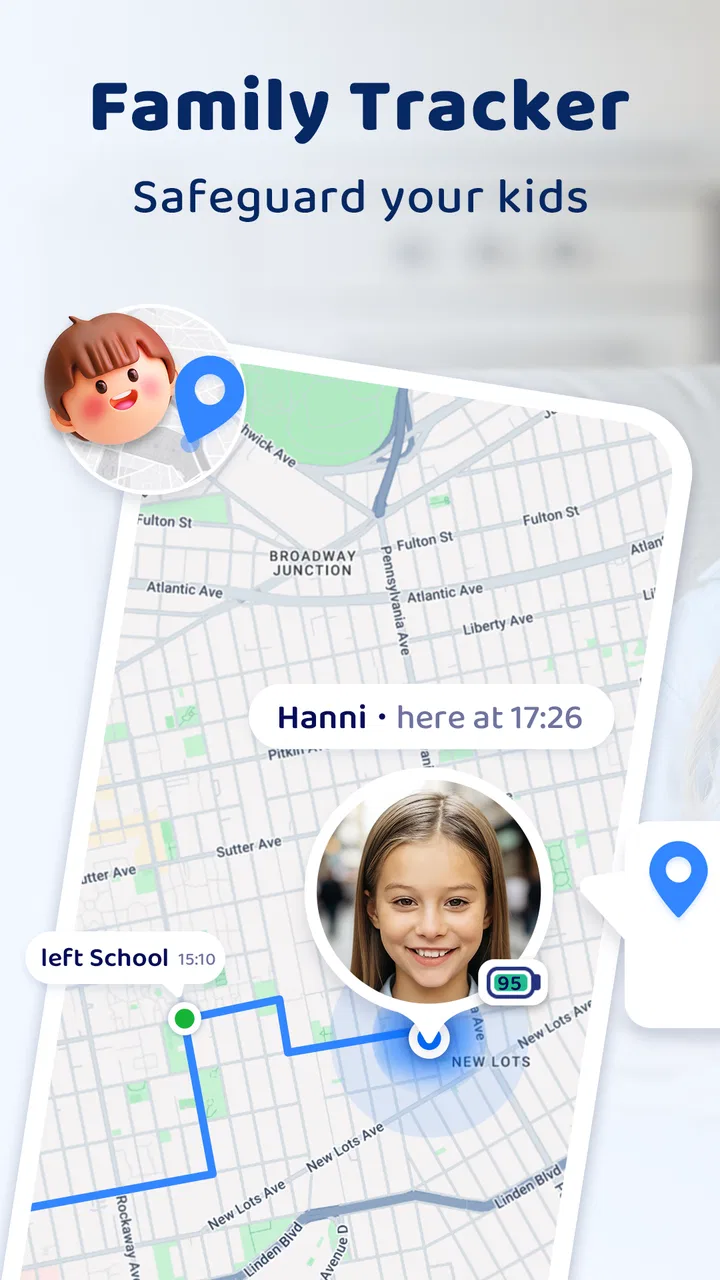
Family Tracker by Phone Number
- 4.5
- Rating
- 5.00M
- Installs
- Free
- Price

 Analysis by App-foxy
I approached Family Tracker by Phone Number as a practical parenting tool rather than a novelty map. Its purpose is straightforward: help families keep track of one another through location-based safety features. That sounds useful immediately, but family-location apps only earn a permanent place on a phone when they reduce worry without creating another daily chore. My experience with this app is that the first impression is easy to understand, while the long-term value depends heavily on how consistently everyone in the family uses it.
Developed by SoulApps Studio, this free parenting app is aimed at families who want a shared way to stay aware of children or relatives. It has reached over five million installs and holds a 4.5 average from around 118 thousand ratings, which suggests that the basic idea connects with a large audience. The app is rated for Everyone, so its presentation is accessible, but parents should still treat location sharing as a serious family agreement rather than something to activate casually.
What using Family Tracker feels like after the first week
The strongest part of the first week is the clarity of the concept. Instead of relying on scattered messages such as “I’m here” or “I’m on my way,” a family tracker gives everyone a shared point of reference. That can be reassuring when a child is walking home, when a teenager is travelling between activities, or when relatives are trying to meet in an unfamiliar area. I found the idea most useful when it supported an existing routine, not when it was treated as a replacement for communication.
You May Also Like

 AccuWeather: Weather Radar
AccuWeather Review: A Quick, Clear Forecast for Everyday Decisions
For everyday plans, the best forecast is the one you can understand quickly. AccuWeather makes rain timing, radar, and local conditions easy to act on, with a few trade-offs.

 Hill Climb Racing
Why Hill Climb Racing Still Turns Crashes Into One More Run
A tiny car, a bumpy hill and one more upgrade: Hill Climb Racing keeps resurfacing because its simple chaos makes every near-miss feel personal.

 AliExpress - Shopping App
AliExpress Makes Global Shopping Feel Personal, but Shoppers Bear the Risk
AliExpress turns a global marketplace into a pocket-sized discovery engine. Its reach is useful, its shopping loop compelling, and its trade-offs easy to miss.

 Lords Mobile: Kingdom Wars
Lords Mobile Is a Kingdom-Building Routine, Not a Quick Match
A case-by-case verdict on the building, battles, device demands, and social commitments that make Lords Mobile rewarding for some players and exhausting for others.

 PDF Scanner app - TapScanner
TapScanner Makes Paperwork Easier to Capture, Check, and Share
TapScanner makes scanning with a phone feel less like a rescue operation and more like a dependable step in getting work done. Its capture tools are useful, though not flawless.

 Block Blast!
 Shows How Much a Puzzle Game Can Leave Out
A quiet grid game shows why puzzle players increasingly value instant clarity, repeatable skill and low-pressure play—and where the genre still needs to catch up.
More From Our News Desk
View All News


A realistic example is a weekday afternoon. One parent is still working, another is preparing dinner, and a child is travelling home from school or practice. Rather than sending repeated messages, the parent can check the family location and decide whether a call is actually necessary. That small reduction in uncertainty is the app’s everyday appeal. It does not solve the wider problem of coordinating a household, but it can remove one repetitive question from a busy evening.
The app’s store summary focuses on family safety and GPS tracking, and that is the right way to understand it. I would not install it expecting a complete parenting platform, a social network, or a substitute for emergency services. Its value is narrower and more practical: it gives families a location-focused tool for staying informed. That narrow purpose is also a strength because the app is easier to judge than a crowded all-in-one family organizer.
During the first few days, the important work is not simply opening the map. The family needs to decide who should be included, when checking a location is reasonable, and what everyone should do if the location appears old or unavailable. This conversation matters more than the novelty of seeing a moving marker. Without clear expectations, a tracker can quickly feel intrusive to children or become a source of unnecessary checking for adults.
I also recommend testing the app during ordinary travel before depending on it for an important outing. Check whether each family member understands how the app is meant to be used, whether the displayed location makes sense, and whether everyone knows that a phone’s battery, connectivity, and settings can affect any location tool. The point is not to distrust the app; it is to avoid confusing a digital indicator with certainty.
The best early use cases are simple and repeated
Family Tracker works best in situations where the same people move through familiar routines. School journeys, commuting, sports practice, visits to relatives, and meeting at a crowded venue are more suitable than vague, continuous surveillance. When the family already knows why the app is open, the map becomes useful context instead of a source of tension.
One less obvious benefit is that it can help coordinate adults as well as children. A parent picking up a child may avoid a needless call if the other adult’s location makes the handoff obvious. Relatives sharing care responsibilities can also use a common reference point when plans change. The important trade-off is that every added person increases the need for agreed boundaries. A larger circle is not automatically a better circle.
Another practical tip is to use the app as a prompt for a backup plan. If a family member’s location does not appear as expected, the next step should already be known: call, send a message, contact the responsible adult, or follow the agreed emergency procedure. This prevents the common mistake of staring at a map while neglecting direct communication.
The current version is 2.24.2, and the app supports Android 5.0 and later. That broad compatibility is helpful for households with older Android phones, although a supported operating system does not guarantee an identical experience on every device. Families using mixed phone ages should test the app on the actual devices they intend to rely on rather than assuming that one successful installation proves everything will behave the same way.
Whether it keeps earning attention month after month
The first-week appeal is easy to understand, but recurring value is a stricter test. A family-location app earns its place when checking it becomes an occasional, purposeful habit rather than a reflex. In my view, Family Tracker can pass that test for families with regular travel routines, children gaining independence, or relatives who genuinely need a shared location reference.
It is less compelling for a household that rarely needs to coordinate movement. If everyone works from home, travels together, or already communicates effectively through ordinary calls and messages, the app may feel unnecessary after the initial curiosity fades. Installing a tracker simply because it sounds reassuring is not enough. The family should be able to name at least one recurring situation in which it saves time or reduces uncertainty.
The most sustainable routine is light-touch use. I would avoid turning the app into a morning, lunchtime, and evening inspection ritual. Instead, use it around known transitions: leaving school, arriving at an activity, travelling to a relative’s home, or meeting in a busy public place. This approach preserves the safety benefit while reducing the chance that parents become dependent on constant visual confirmation.
There is also a useful distinction between coordination and reassurance. Coordination asks, “Where should we meet, and is everyone moving as expected?” Reassurance asks, “Is something wrong because I have not heard from someone?” The app can help with the first question, but the second still requires judgment and communication. A location that appears normal does not prove that a person is safe, and a delayed or unexpected location does not automatically mean there is an emergency.
For teenagers, the long-term success of the app depends on trust. If tracking is introduced as an explanation of safety arrangements, it has a better chance of becoming part of a healthy routine. If it is used as silent monitoring, the family may stop sharing honestly or begin treating the phone as a source of conflict. I would make the rules visible: who can see whom, when checking is appropriate, and when the family should call instead.
What makes the app more useful than a basic message thread
Ordinary messaging is often enough for a single trip, but it becomes awkward when several people need the same update. One person forgets to reply, another sends an outdated estimate, and a third does not know whether the plan changed. A family tracker offers a shared location view, which can reduce that chain of small misunderstandings.
That does not make it universally better than messaging. Messages provide context, explanations, and confirmation in a way a map cannot. If a child is delayed because practice ran late, the location alone does not explain the delay. My preferred approach is to use the tracker for orientation and messages or calls for meaning. Treating one as a replacement for the other is where many family-safety routines become brittle.
Compared with a general family organizer, this app is more focused on location and less likely to be useful for calendars, shopping lists, chores, or shared notes. That focus may appeal to someone who wants a dedicated tracker without adopting a broader household-management system. On the other hand, families looking for one place to manage schedules and communication may prefer a more comprehensive alternative, even if its location tools are less central.
Compared with built-in phone-location tools, the decision is more personal. A family may already have location sharing available through the phones and accounts it uses every day. Family Tracker becomes more attractive when its dedicated parenting focus feels easier for the household to understand. If the existing tools already meet the family’s needs and everyone is comfortable with them, adding another app may create duplication rather than improvement.
The maintenance burden people notice later
Every location app has a maintenance side, and that side is easy to overlook during installation. The family must keep the right people included, remember which device belongs to whom, and notice when a phone is unavailable or no longer being used. The app itself cannot maintain a family’s routine; someone has to keep the routine clear.
I would assign responsibility for reviewing the setup to one adult, but not for secretly controlling everyone’s access. That person can check whether the family list still reflects reality and whether an old device or former arrangement should be removed. The review should be occasional and transparent. A tracker becomes harder to trust when nobody knows who can see the information or why a person remains included.
Another maintenance issue is interpretation. A location display can be delayed, imprecise, or affected by the phone’s condition. Rather than promising yourself that the map will always be live and exact, build a habit of checking the time and context of what you see. If a location seems inconsistent with the person’s plan, contact them before drawing conclusions. This is one of the most important practical limits of relying on any phone-based tracker.
Battery management is part of the same problem. A phone that is switched off or nearly empty cannot provide the same reassurance as a functioning phone. Families should agree that the app is one layer of a safety plan, alongside charged devices, known routes, emergency contacts, and age-appropriate independence. That may sound obvious, but it is precisely the kind of detail people forget once the novelty of the map wears off.
The free price makes trying the app easy, but optional purchases range from $0.99 to $49.99 per item. I would not spend money merely to make the app feel more official or because a family member is anxious. First establish whether the free experience fits the household’s routine and whether everyone is comfortable with the arrangement. Any purchase should answer a specific need that the family has already identified, not create a new reason to keep checking.
That pricing range also means parents should pay attention during setup and use. Free installation does not necessarily mean every possible capability is included without cost. Before approving an in-app purchase, I would consider who benefits, whether the feature will be used regularly, and whether a built-in phone tool already handles the same task. A dedicated app is only worthwhile when its convenience is greater than the extra cost and maintenance.
Where fatigue and family tension can appear
The biggest source of fatigue is overchecking. A parent may open the app repeatedly because a child is a few minutes late, even though the child is safe and simply walking home. That habit can turn a helpful tool into an anxiety trigger. I think the healthiest use is event-based: check when there is a genuine coordination reason, then close the app and continue with the day.
Children may also feel that location sharing changes the meaning of independence. A teenager who is allowed to travel alone may interpret constant tracking as a lack of trust. The app cannot solve that emotional issue. Families need to decide whether the benefit is worth the compromise and whether the arrangement should change as a child becomes more responsible.
Privacy is another reason to be selective about membership. I would not add distant acquaintances, casual friends, or anyone who does not have a clear role in the family’s safety plan. A smaller circle is easier to explain and maintain. It also reduces the chance that location information is shared more widely than the family intended.
There is a practical risk in assuming that a tracker removes the need for check-in habits. A child may think the parent can always see the route, while the parent assumes the child will call if something goes wrong. That mismatch is more dangerous than either person’s expectation being clear. Make the responsibilities explicit: the app can support the plan, but it does not replace agreed calls, messages, or emergency action.
I would also skip this app if the family is looking for professional monitoring, guaranteed emergency response, or a full parental-control suite. Its purpose is family location awareness, not a promise that every safety concern will be handled automatically. A household with complex safeguarding needs should choose tools and support designed for those requirements rather than stretching a consumer tracker beyond its role.
The app may also be a poor fit for people who strongly dislike recurring permissions, shared location arrangements, or another notification source. Even when the software is easy to operate, the social agreement around it can be demanding. If nobody wants to discuss boundaries or keep the setup current, the app is unlikely to provide lasting value.
My long-term verdict on keeping it installed
After the first week, the question is not whether seeing family locations feels impressive. The question is whether the app helps a real household make better decisions with less friction. For families with children travelling independently, relatives sharing care, or adults coordinating regular pickups, Family Tracker has a reasonable case for staying installed. Its focused purpose can be more convenient than a loose collection of messages.
My recommendation is to introduce it with a short family agreement. Decide who participates, define appropriate checking times, explain what to do when a location looks wrong, and agree that direct communication remains important. Revisit the arrangement when a child’s routine changes or when the family notices that checking has become compulsive. This turns the app from a passive surveillance tool into a deliberately managed part of family safety.
The app’s free entry point, Everyone content rating, broad Android compatibility, and strong user response make it approachable for many households. SoulApps Studio has positioned it clearly within parenting, and the 4.5 average from its large rating base indicates that the central experience works for many people. Still, popularity does not remove the need to judge whether the app fits your family’s habits, privacy expectations, and existing phone tools.
For me, its lasting value comes from occasional coordination rather than constant monitoring. I would keep it on a family phone when it supports school travel, pickups, visits, or other repeated situations where knowing a general location genuinely helps. I would remove it, or choose a simpler alternative, if it only adds anxiety, duplicates an existing feature, or encourages everyone to watch the map instead of speaking to one another.
The best reason to keep Family Tracker is not that it can show where someone is, but that it can make a clear family safety routine easier to follow. Used with boundaries and realistic expectations, it can remain useful beyond the first-week novelty. Used as a substitute for trust, communication, or emergency planning, it is unlikely to earn a permanent place in the household.
FAQs for Family Tracker by Phone Number
01What is Family Tracker by Phone Number and how does it work?
Family Tracker by Phone Number is a location-sharing app designed to help families stay connected. It allows users to share real-time locations with family members using GPS technology. The app requires both parties to have it installed and permissions granted for location sharing. Users can view each other's locations on a map and receive notifications about their movements.
02Is Family Tracker by Phone Number safe to use?
Yes, Family Tracker by Phone Number is designed with safety in mind, using secure data encryption to protect users' location information. It requires explicit consent for location sharing, ensuring that only authorized family members have access to your whereabouts. It's important to review the app’s privacy settings and terms before use.
03Can I use the app without an internet connection?
Family Tracker by Phone Number requires an internet connection to function effectively, as it relies on GPS and data to provide real-time location updates. Without an active internet connection, the app cannot transmit location data, limiting its functionality. It's recommended to have a stable connection for optimal performance.
04What are the main features of Family Tracker by Phone Number?
The app offers several key features, including real-time location tracking, location history, geofencing alerts, and emergency SOS. Users can set up safe zones and receive notifications when family members enter or leave these areas. The app also allows for location sharing at specific times, enhancing family coordination.
05Are there any subscription fees or in-app purchases?
Family Tracker by Phone Number offers both free and premium versions. The free version includes basic location tracking features, while the premium version provides additional functionalities like advanced location history and priority support. Subscription fees for the premium version vary, and users can choose a plan that suits their needs.
Pros
- Accurate location tracking in real-time.
- Easy to use with a clean interface.
- Works on both Android and iOS devices.
- Battery-efficient without draining power.
- Allows multiple users on a single account.
Cons
- Requires constant internet connection.
- Limited features in the free version.
- Privacy concerns for some users.
- Can be intrusive if misused.
- Notification alerts can be overwhelming.

Family Tracker by Phone Number
Gallery